


Wearables and data security



Alan Bavosa at Appdome explains the importance of preventing wearable health apps from compromising customers’ data security
Wearable devices, such as smart watches, are becoming increasingly popular. To meet demand, brands are stepping up production and launching them alongside smartphones, so by 2024, it is predicted that over 440 million wearables will be sent out to customers annually.
Key to their rising adoption and popularity is the well-rounded and easy-to-digest snapshot they provide on customers’ personal health data. They deliver this through their use of sensors that can pick up data from users’ bodies – like heart rate or step count – and transmit it to wearable health apps.
As adoption of wearables continues to grow, this makes them an attractive target of hackers and fraudsters, in part due to the immense amount of highly personalized data that they handle. For example, many wearable apps are designed for health and fitness tracking. They may collect sensitive health-related data such as heart rate, blood pressure, sleep patterns, calories burned, and activity levels.
This information may be considered personally identifiable information (PII) or personal health information (PHI) and could be subject to strict privacy regulations or health industry regulations such as HIPAA.
Wearable apps also include location data, such as GPS or other location-tracking technologies to provide services like mapping, navigation, or activity tracking. Location data can reveal a person’s movements and habits, making it sensitive and potentially privacy-invading if mishandled.
- Biometric data: Some wearables, such as smartwatches or fitness bands, incorporate biometric sensors like fingerprint scanners, heart rate monitors, or electrocardiograms (ECG). These sensors collect unique physiological data, which is considered extremely sensitive and can be used for authentication or health monitoring purposes.
- User profiles: Wearable apps may store user profiles that include personally identifiable information (PII) like names, contact details, email addresses, and usernames, and there would also be artifacts of personal data stored in places like app preferences as plain text XML strings. This information is highly valuable to bad actors.
Encrypt data to comply with privacy laws
To shore up wearable health app security, developers should consider using data encryption to protect the data stored on the device, as well as data in transit, as data moves between APIs and across public networks.
In addition, wearable apps often store sensitive data within the application code or as text-based strings, so it is also important to encrypt data beyond the application sandbox, including keys, secrets, tokens, URLs, and payloads – stay secure even if a hacker tries to intercept it. This is essential for compliance with relevant privacy laws. For example, in the UK, patient data must be protected under the Data Protection Act (DPA). Companies can be hit with significant financial fines if they do not comply with this legal framework.
In addition, to suffering immense reputational damage that can result in the loss of customers and further economic repercussions to the business.
Secure communication between apps and infrastructure
Hackers also often attempt to take advantage of the communication between the wearable device/app and the server infrastructure that the app connects to. There are many different tools, techniques and methods hackers use to compromise mobile data as it travels across a network or the public internet.
Some of the most common threats to mobile data in transit are Man-in-the-middle (MitM) attacks, malicious proxies, forged digital certificates, fake Wi-Fi, session hijacking or session replay attacks, or exploiting weak or outdated encryption methods or algorithms, and much more. This can pose real-world dangers as it can be used to falsify crucial health data, which can prove to be life-threatening.
Reassuringly, there are certain precautions developers can take to secure the channel of communication between the mobile app and the mobile backend.
It all starts with ensuring that SSL/TLS handshake is established correctly, as this is likely to be the first place an attacker will try to insert themselves to intercept or hijack the session before the secure channel is established.
To prevent such an attack will require multiple security defenses, such as SSL certificate validation and TLS enforcement might not be a bad idea, to ensure that a secure version of TLS is used to establish the secure connection. If a stronger security posture is required, then developers may want to implement certificate pinning, which would ensure that the app only connects to hosts/servers that are known to be trusted.
And of course, you will want to ensure that any key material or certificate info is obfuscated and stored securely inside the app using methods such as code obfuscation. By encrypting data developers can prevent any unauthorized entities from accessing private data.
Protect wearables against malware
In addition to encryption, wearable health apps are also susceptible to mobile malware and Trojans, which mobile wearable users may unknowingly download or encounter via numerous channels, such as fake apps or clones, phishing links, disreputable app stores.
Today’s modern malware use a wide variety of highly sophisticated techniques to trick mobile users into performing harmful actions or revealing sensitive data. These attack techniques range from tricking users into approving dangerous or highly privileged mobile app permissions to abusing OS services like Accessibility Services, which can be used to monitor user activity, harvest data, intercept or inject keystrokes and much more.
Attackers of apps that share personal data have become fond of overlay attacks as well, which is an attack type in which the user is tricked into performing harmful actions or revealing sensitive data after interacting with malware that intentionally covers part of the users’ screen with a malicious overlay. Overlays may also use some form of masquerading on the part of malware apps or Trojans.
Introduce data loss prevention tools
Beyond protecting customers from hackers, companies should also put measures in place to protect users from themselves as they can often prove to be the weak link that allows their sensitive data to be misappropriated. For example, it is common for users to copy data from their app and paste it somewhere else, such as in a browser to look up more information.
People also take screenshots of their data for later use. However, there are many ways that sensitive information can leak from the app either inadvertently or via data theft or harvesting, especially if the device has existing malware resident on it.
To combat data leakage developers could consider implementing copy/paste and screen recording preventions – making it harder for users to expose their data through sharing. Going a step further, developers could also consider preventing screen captures/screenshots/mirroring or screen recording. Implementing one or more of these defences will add further protection against data leakage.
And of course, it would be highly advisable to protect the mobile app against static and dynamic reverse engineering, which hackers typically perform to learn how a mobile app functions by decompiling and reading the source code directly, and/or by observing the app as it runs, using tools like debuggers and emulators.
To protect against such nefarious activities, developers should obfuscate native and non-native source code, libraries as well as the application’s logic, combined with several basic dynamic protections such as Anti-tampering, Anti-debugging, and preventing the app from being run on emulators or other powerful app players.
Get ahead of hackers with automation
By 2026, the wearable technology market is estimated to be worth $265.4 billion. As the market grows, so too do concerns surrounding its security. Hackers are recognising society’s growing dependence on wearable health apps and are attempting to cash in. Protecting a mobile-first consumer is very different from protecting an online or web consumer. The attacks and threats are different, the delivery model is different, and the consumer expectation is higher.
To protect your mobile consumers and apps requires thinking and acting like a dev team, embracing agile systems that offer no-code delivery, threat intelligence, and automation to rapidly deliver protections directly inside Android & iOS apps all within the DevOps CI/CD pipeline and workflows.
Alan Bavosa is VP Security Products at Appdome
Main image courtesy of iStockPhoto.com
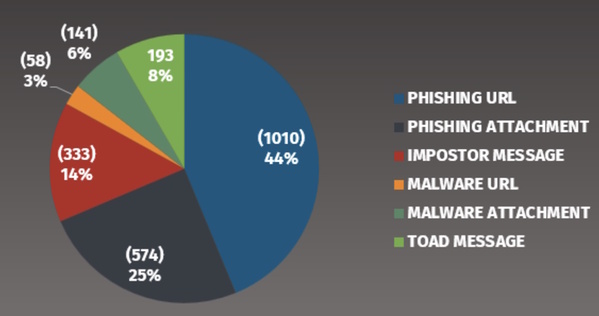
In this chart we see the following:
- 69% of all phishing emails attempt to take the victim to a website to gather information. This is primarily password harvesting but may also include sites that include “surveys”.
- 14% are imposter-based attacks, this would include scams such as BEC attacks, gift card, or billing / invoice scams.
- 8% are Telephone Oriented Attack Delivery (TOAD) attacks. This is a new category that Proofpoint added in 2023 due to the increase of these type of phishing attacks. The goal is for the victim to call a phone number.
- Only 9% of all phishing emails are attempting to infect the victim with malware (via clicking on a URL or opening an email attachment).
The key takeaway here? Phishing is no longer about infecting your computer. The primary goal of phishing is to steal peoples credentials (logins and passwords) so they can then login as their victims.
In addition, we see both imposter-based (like BEC) and telephone-based phishing attacks continue to rise. Who needs to steal money or passwords when you can literally just ask for it.
If you can pull reports like the one above, you can track who cyber-attacker phishing TTPs change over time.
Signs to look out for
What should we teach people so they can easily detect these ever evolving attacks? We do not recommend that you try to teach people about every different type of phishing attack and every lure possible. Not only is this most likely overwhelming your workforce but cyber-attackers are constantly changing their lures and techniques.
Instead, focus on the most commonly shared indicators and clues of an attack. This way your workforce will be trained and enabled regardless of the method or lures cyber-attackers use. In addition, emphasise that phishing attacks are no longer just about email but use different messaging technologies.
That is why the indicators below are so effective, they are common in almost every phishing attack, regardless of the goal and if its via email or messaging.
- Urgency: Any email or message that creates a tremendous sense of urgency, trying to rush the victim into making a mistake. An example is a message from the government stating your taxes are overdue and if you don’t pay right away you will end up in jail. The greater the sense of urgency the more likely it is an attack.
- Pressure: Any email or message that pressures an employee to ignore or bypass company policies and procedures. BEC / CEO Fraud attacks are a common example.
- Curiosity: Any email or message that generates a tremendous amount of curiosity or too good to be true, such as an undelivered UPS package or you are receiving an Amazon refund.
- Tone: An email or message that appears to be coming from a co-worker, but the wording does not sound like them, or the overall tone or signature is wrong.
- Generic: An email coming from a trusted organisation but uses a generic salutation such as “Dear Customer”. If FedEx or Apple has a package for you, they should know your name.
- Personal email address: Any email that appears to come from a legitimate organisation, vendor or co-worker, but is using a personal email address like @gmail.com.
Phishing indicators of the past
These are typical indicators that have been recommended in the past but we no longer recommend them
- Misspellings: Avoid using misspellings or poor grammar as an indicator, in today’s world you are more likely to receive a legitimate email with bad spelling than a crafted phishing attack. Misspellings will most likely become even less common as cyber-attackers use AI (Artificial Intelligence) solutions to craft and review their phishing emails and correct any spelling or grammar issues.
- Hovering: One behavior commonly taught is to hover over the link to determine if its legitimate. We no longer recommend this method except for highly technical audiences. Problems with this method include you have to teach people how to decode a URL, a confusing, time consuming and technical skill. In addition, many of today’s links are hard to decode as they are re-written by phishing security solutions such as Proofpoint.
Also, it can be difficult to hover over links with mobile devices, one of the most common ways people read email. Training individual employees to analyse every email link can also be extremely costly to the business.
Organisations must stay up-to-date with the most effective forms of detection for phishing attacks to ensure they stand the best chance of survival.
Lance Spitzner is Director of Security Awareness at the SANS Institute
Main image courtesy of iStockPhoto.com



Most Viewed
The Expert View: Achieving Resilience in the Age of AI and Cyber WarfareSponsored by BT & Zscaler


Winston House, 3rd Floor, Units 306-309, 2-4 Dollis Park, London, N3 1HF
23-29 Hendon Lane, London, N3 1RT

020 8349 4363

© 2025, Lyonsdown Limited. teiss® is a registered trademark of Lyonsdown Ltd. VAT registration number: 830519543